
AutoTrader is a trademark of its owner. Auto Studio is not affiliated with or endorsed by AutoTrader. Marketplaces update their image requirements from time to time, so always check the current guidance in your retailer account before you upload.
Why photos matter so much on a marketplace
On a busy marketplace, your car sits in a list next to many similar ones. Buyers scroll quickly, and the main photo is often the only thing they look at before deciding whether to click. Once they do, the rest of the gallery is your chance to show the car properly: its condition, its interior, its features, and the fact that it is being sold by a dealer who takes care over the details.
Good photos don't need expensive equipment. They need to be well framed, consistent and clear. That is exactly what Auto Studio is designed to help with.
Step 1: Prepare the car
You don't need to wash the car first. Turn on Car Cleanup and the AI removes dirt, dust, mud, road grime, water spots and bird droppings, tidies minor dents, scratches, scuffs and paint chips, polishes the paint, cleans the alloys and dresses the tyres. Car Cleanup doesn't touch the interior, so before you take any photos:
- clear personal items, paperwork and air fresheners from the cabin;
- remove trade plates and any old stickers or dealer decals you don't want in the shots;
- straighten the front wheels so they point forwards for the exterior shots;
- check the lights, mirrors and wipers are all in their resting positions;
- find even light, avoiding low sun straight into the lens or harsh shadows across the car.
Step 2: Take the same shots every time
Buyers find it easier to compare cars when every listing follows the same order. Decide on a standard shot list and stick to it. A good starting point is a front three-quarter lead image, followed by the front, side, rear and rear three-quarter views, then the interior, dashboard, seats, boot and any key features. Our car photo angle checklist sets out a full list you can print for the team.
The Auto Studio camera makes this easier. A ghost overlay shows you where the car should sit for each of seven guided angles, so every car is framed the same way regardless of who takes the photo.
Step 3: Get the framing right
Fill most of the frame with the car without cutting anything off. Keep the whole car in shot, including the bumpers, mirrors and wheels. In the Auto Studio camera, the one rule to remember is to keep the points where both tyres touch the ground below the red line. That gives the AI what it needs to sit the car naturally on its new background. Our guide on why both tyres need to be in frame explains the reasoning with examples.
Step 4: Replace the background
Most forecourts have something in the background that you would rather buyers didn't see: other cars, buildings, bins, signs, or simply a grey sky. Auto Studio removes the original background and places the car on a clean, consistent scene of your choice.
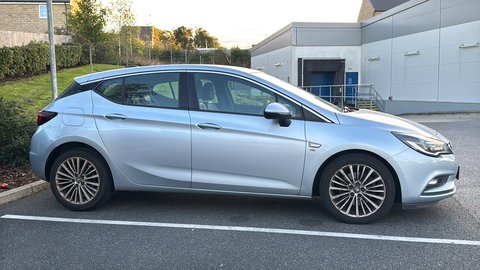 Before
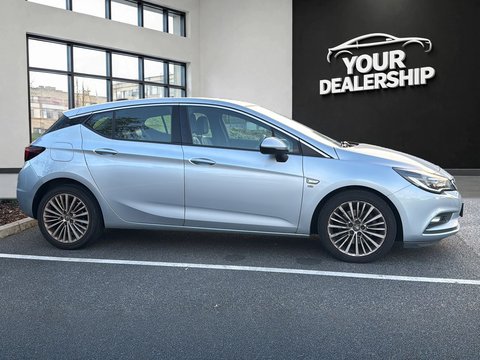 ✨ After Auto Studio
Using the same background across your stock gives your listings a recognisable, professional look. You can also brand the number plate with your dealership name and add your logo. Read more about car photo background removal for dealers, or see how to use Auto Studio for every setting step by step.
Step 5: Check, download and upload
Look through each processed image before you publish it. Check the edges around the wheels and mirrors, and make sure the photos still give an honest picture of the car, including any marks a buyer should know about. Then download the images from your Auto Studio gallery and upload them in your usual order.
Keep it consistent in British weather
Rain and grey skies are the main reasons forecourt photos look inconsistent. Replacing the background removes much of the problem, and Car Cleanup takes care of water spots and road grime on the car. AI Improvement removes reflections and AI Relighting matches the car's lighting to the new background, but a photo taken in even light still gives the best result, so our guide to forecourt photos in bad weather has practical tips for dealing with low winter sun and shooting between showers.
Make it a routine
The dealers with the most consistent listings are rarely the ones with the most expensive kit. They are the ones with a routine: the same preparation, the same shot list, the same background and the same order every time. Write yours down, share it with everyone who photographs stock, and use a camera guide so a new member of staff can match the rest of your listings on day one. For shorter, quick-fire advice, see our AutoTrader image tips, and if you are comparing tools, our page on car dealer photo editing software covers the features to look for.
What it costs
Auto Studio is priced in pounds sterling, and 1 credit = 1 processed photo, whichever options you turn on. Accounts registered during our current launch offer get 10 free credits every month, with no credit card required.
On every plan, 1 credit = 1 processed photo, whichever options you turn on. *10 free credits every month for accounts registered during the current launch offer, no credit card required. 50% off your first paid month is applied at checkout. Larger plans, annual billing and Pay As You Go credits are on the full pricing page.