
Why UK dealers choose Auto Studio
If you are looking for AI car photography, you already know that clean, consistent images help your listings. Auto Studio was built for car dealerships and is based in the UK, so it is designed around how UK forecourts actually work: phone photos taken between other jobs, changeable British weather, and stock that needs to be on AutoTrader and your own website the same day.
Car Studio AI is a trademark of its owner. Auto Studio is an independent UK product and is not affiliated with it.
What makes Auto Studio a good fit for UK dealerships
- UK-based, priced in pounds. Plans are in GBP, and 1 credit = 1 processed photo, whichever options you turn on, so your monthly cost is easy to predict.
- No need to wash the car first. Car Cleanup removes dirt, road grime and water spots, and tidies minor dents and scratches on the exterior, which suits a wet British forecourt.
- A camera that guides the shot. Anyone on your team can take photos that match, without photography training.
- Your branding on every car. Brand the number plate with your dealership name, add your logo and choose from more than 60 standard backgrounds, including branded showroom scenes. Custom backgrounds are available on Starter and above (limited-time offer).
- Built for volume. Process a whole delivery of stock at once with bulk processing.
- Works on the devices you have. Web, iPhone and Android, with one account across all of them.
How Auto Studio works
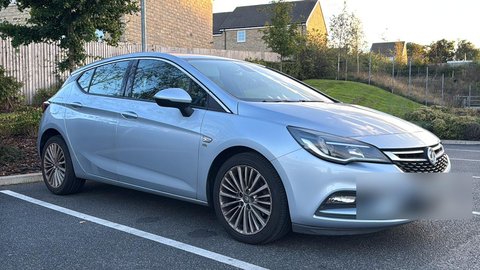 Before
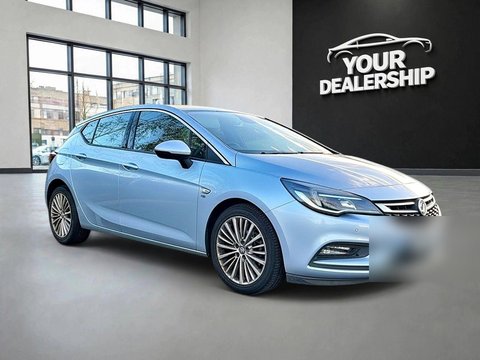 ✨ After Auto Studio
Capture: a camera that guides the shot
The Auto Studio camera shows a ghost overlay of a car on your screen, with seven guided angles. You line the vehicle up with the outline and keep the points where both tyres touch the ground below the red line. That makes it much easier for anyone on your team to take photos that match. Read more in our guide to keeping both tyres in frame.
Car Cleanup: skip the wash
Turn on Car Cleanup and the AI removes dirt, dust, mud, road grime, water spots and bird droppings, tidies minor dents, scratches, scuffs and paint chips, polishes the paint, cleans the alloys and dresses the tyres. It works on the exterior only, so you still need to declutter the cabin and remove trade plates before you shoot.
Processing: background, plate and logo
The AI removes the original background and places the car on one of more than 60 backgrounds, including studio and branded showroom scenes. It can also brand the number plate with your dealership name or custom text, and add your logo in a consistent position. Optional switches handle the finish: Keep the floor, Soft Shadow, AI Improvement for reflections and AI Relighting to match the background. A typical image takes under ten seconds. See car photo background removal for more detail, or how to use each feature.
Workflow: bulk, gallery and devices
You can upload and process several vehicles at once with bulk processing. Finished images are stored in a private gallery you can reach from the web, iPhone or Android, and Business plans and above include API access if you want to connect Auto Studio to your own systems.
Pricing in GBP, with a free way to try it
Auto Studio is priced in pounds sterling, and 1 credit = 1 processed photo, whichever options you turn on. Accounts registered during our current launch offer get 10 free credits every month, with no credit card required, so you can try it on real cars from your own stock.
On every plan, 1 credit = 1 processed photo, whichever options you turn on. *10 free credits every month for accounts registered during the current launch offer, no credit card required. 50% off your first paid month is applied at checkout. Larger plans, annual billing and Pay As You Go credits are on the full pricing page.
Get started in an afternoon
- Create a free account on the web, iPhone or Android.
- Pick a few cars from your current stock, declutter the cabins and remove any trade plates.
- Photograph each one with the guided camera, keeping both tyres below the red line.
- Turn on Car Cleanup, choose your background, plate branding and logo, and process the photos.
- Download the finished images and upload them to AutoTrader and your own website.
Our car photo angle checklist gives you a ready-made shot list, the AutoTrader photo guide covers the listing workflow, and our AI car photography for UK dealers page explains the basics if you are new to it.