
Why general photo editors are hard work for dealers
General-purpose photo editing software is powerful, but it was not designed for a dealership. To give one car a clean background, you might cut it out by hand, fix the edges around the wheels and mirrors, add a shadow so it doesn't look like it is floating, then repeat for every angle. With a full set of photos for every car and a steady flow of new stock, that quickly adds up to hours each week.
It also depends on whoever is doing the editing. Different people make different choices, and the result is a stock list where no two cars quite match.
What dealer photo editing software should do
Software built for dealers should do the repetitive work automatically and give you the same result every time. In practice, that means:
- removing and replacing backgrounds without manual cutting out;
- keeping wheels, tyres, mirrors and glass looking natural;
- handling number plates in a way that suits your business;
- adding your branding consistently;
- processing a whole batch of cars at once;
- working on the phones and computers you already have.
What Auto Studio edits for you
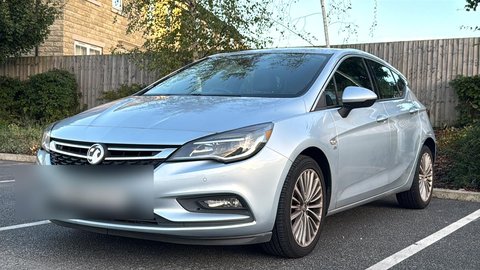 Before
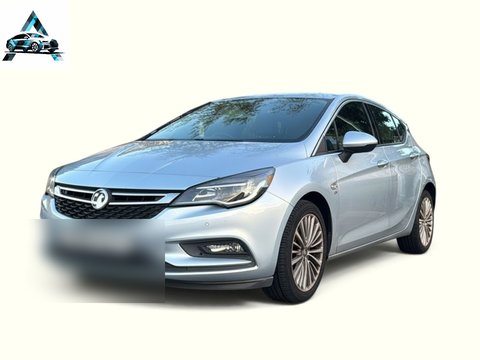 ✨ After Auto Studio
Background replacement
Auto Studio finds the car in your photo, removes everything around it and places it on a background of your choice. There are more than 60 standard backgrounds to pick from, including clean studios, outdoor scenes and branded showrooms, and custom backgrounds are available on Starter and above (limited-time offer). Using the same background across your stock gives your listings a consistent look. Our page on car photo background removal goes into more detail.
Number plate branding
Many dealers prefer not to show registration plates in listing photos. Auto Studio can replace the plate with your dealership name or any custom text, so every car carries your brand instead.
Logo overlay
Add your dealership logo to every image automatically. You control the position and size, and the same settings are applied to every photo, so your branding is always in the same place.
Car cleanup and correction
Turn on Car Cleanup and the AI removes dirt, dust, mud, road grime, water spots and bird droppings, tidies minor dents, scratches, scuffs and paint chips, polishes the paint, cleans the alloys and dresses the tyres, so there is no need to wash the car before you shoot. It works on the exterior only, not the interior. As with any edit, check the result and make sure your photos still give buyers an accurate picture of the car's condition.
Lighting, reflections and floor
AI Relighting matches the car's lighting to the new background, AI Improvement removes reflections and enhances the paint, Keep the floor keeps the real ground from your photo, and Soft Shadow gives the car a soft shadow on a new floor. Each is a switch in Processing Settings; car photo background removal explains when to use them.
Bulk processing
Upload a full set of photos for several vehicles and process them together, instead of opening each image individually. A typical image takes under ten seconds to process.
AI listing descriptions (coming soon)
AI-written vehicle descriptions for your listings are on the way, and show as "Soon" in the app today.
Step-by-step instructions for every option are in how to use Auto Studio.
Editing starts with a better photo
The quickest edit is the one you don't need to make. Auto Studio's camera includes a ghost overlay with seven guided angles, so photos are framed consistently before they are edited. Keep the points where both tyres touch the ground below the red line, and the AI has everything it needs to place the car naturally. Our car photo angle checklist and both tyres in frame guide explain how.
A typical dealer workflow
- A car arrives and is prepared for sale.
- Someone on your team photographs it on the forecourt using the Auto Studio camera.
- The photos are processed with your usual background, plate branding and logo.
- The finished images appear in your gallery, ready to download on any device.
- You upload them to your website and the marketplaces you use. Our AutoTrader photo guide has tips for that step.
If you are new to the idea, our introduction to AI car photography for UK dealers covers the basics, and the how it works page walks through the app screen by screen.
Pricing for UK dealers
Auto Studio is priced in pounds sterling, and 1 credit = 1 processed photo, whichever options you turn on. Accounts registered during our current launch offer get 10 free credits every month with no credit card required. Paid plans start at £49.99 a month, with 50% off your first paid month.
On every plan, 1 credit = 1 processed photo, whichever options you turn on. *10 free credits every month for accounts registered during the current launch offer, no credit card required. 50% off your first paid month is applied at checkout. Larger plans, annual billing and Pay As You Go credits are on the full pricing page.